Searching for a Message Group
The message group search function can be used to search for a specific message group. Message groups can be searched for by both message group ID, message group name, or both. Note that if entries are made in both fields the results list is limited to message groups that contain both search strings.
The wildcard feature can be used when searching for a message group. For example, if you know that the word “Group” is in the message group name, enter %Group% to include every message group that has the word “Group” in the name. For more information about wildcards, please refer to Search Techniques.
1. Select the Message Groups option from the menu bar. The Message Groups screen displays.
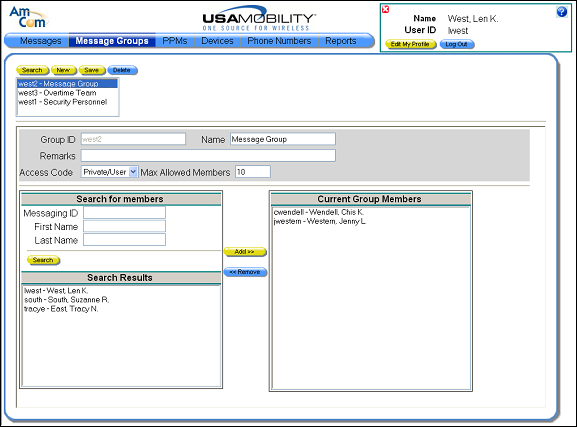
2. A list of the message groups created by the user displays in the selection window. The Search function can be used to limit the list.
3. Click on the Search button. The selection window is changed to a set of search fields.
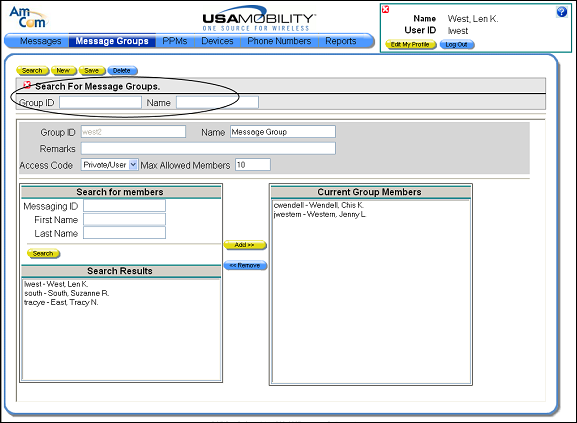
4. In the search fields, enter a message group ID or name, or both. Note that if entries are made in both fields the results list is limited to message groups that contain both search strings. Both fields are case-sensitive. Wildcards can be used if you aren’t sure of the exact name or message group ID.
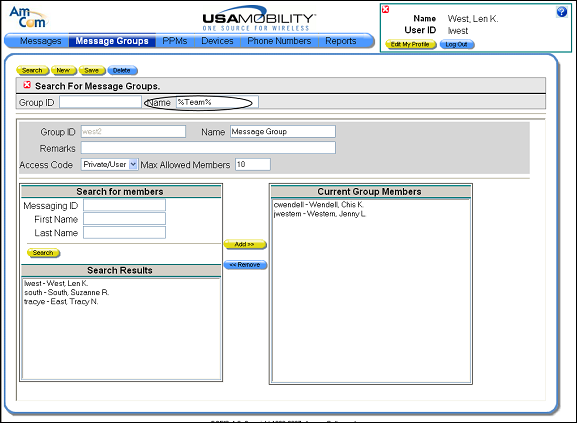
5. Click the Search button to search for message groups that match the search string. The search results display in the selection window.
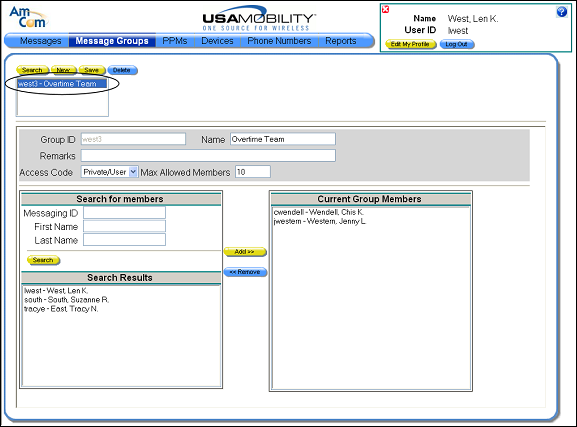
6. Select a message group in the selection window. Information about the selected group is displayed.