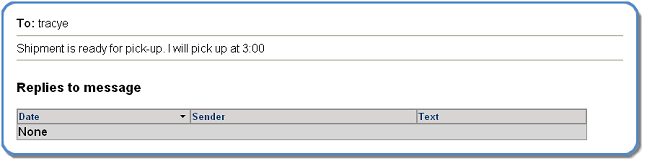
Replying to a Message
A user can reply to a sent message. The reply can only be sent to the person who originally sent the message.
A green and white plus sign icon displays next to a message that is too long to display completely in the Received screen. Click the icon to display the entire message in a new message box.
A reply can be sent only if the user is assigned the SEND/RECEIVE or SEND ONLY messaging types. Users assigned the RECEIVE ONLY type can view received messages, but cannot reply.
1. Select the Received option from the Messages option in the menu bar. The Received screen displays.
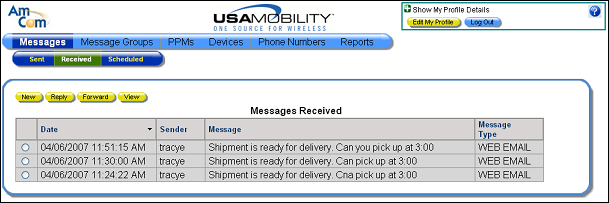
2. Click on the radio button next to the message to which you want to reply.
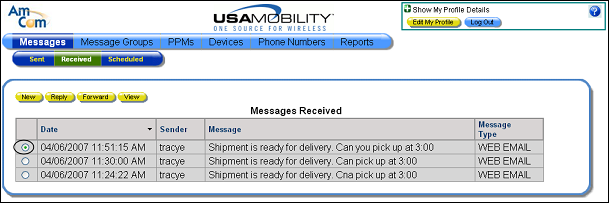
3. Click the Reply button. The Reply to Message screen displays.
NOTE: The Reply button is not available if a user is assigned the RECEIVE ONLY message type.
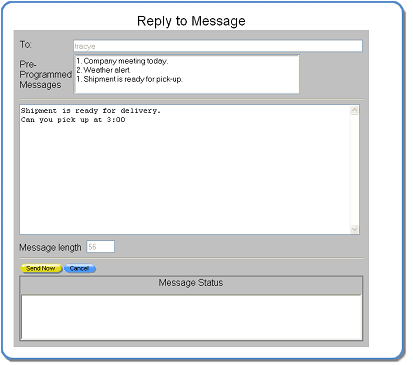
4. Enter the reply message in the message window. A user can enter text manually, choose a pre-programmed message (PPM), or do both. When text is entered manually and a PPM is selected, the PPM is inserted before the manually entered message.
The original message can be deleted by highlighting the message and pressing <Delete>. Deleting the original message is optional.
Both company and personal PPMs are listed in the Pre-Programmed Messages window. The company PPMs are the top of the list. Double-click on a PPM to select it. More than one can be selected.
The length of the message, measured by number of characters, displays in the Message Length window.
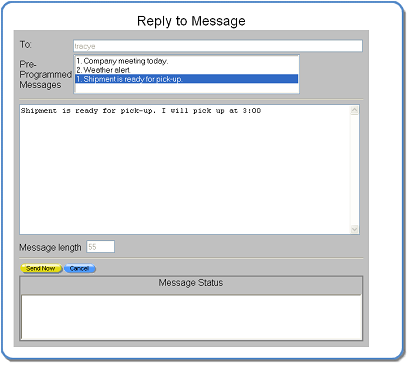
5. Click the Send Now button to send the reply. The message status displays in the Message Status window and the window is automatically closed. The Received screen redisplays.
6. The reply shows as a sent message in the Sent window. Choose the Sent option from the Messages menu.
7. Select the radio button for the message that was just replied to review the reply.
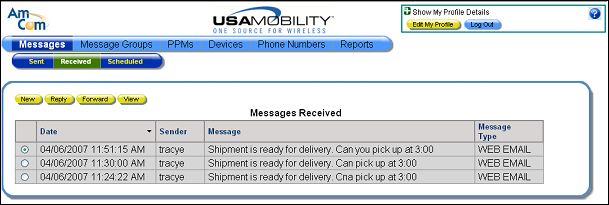
8. Click the View button. The reply displays in a new window. Click the X button to close the reply window.

9. The reply also shows as a sent message in the Sent window. Choose the Sent option from the Messages menu.
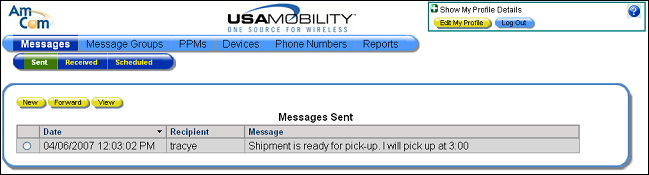
10. Click in the radio button next to the message you want to review.
11. Click the View button to display to view the sent reply message. Click the X button to close the sent message window.